# WS 10 - Restaurant Database Management System
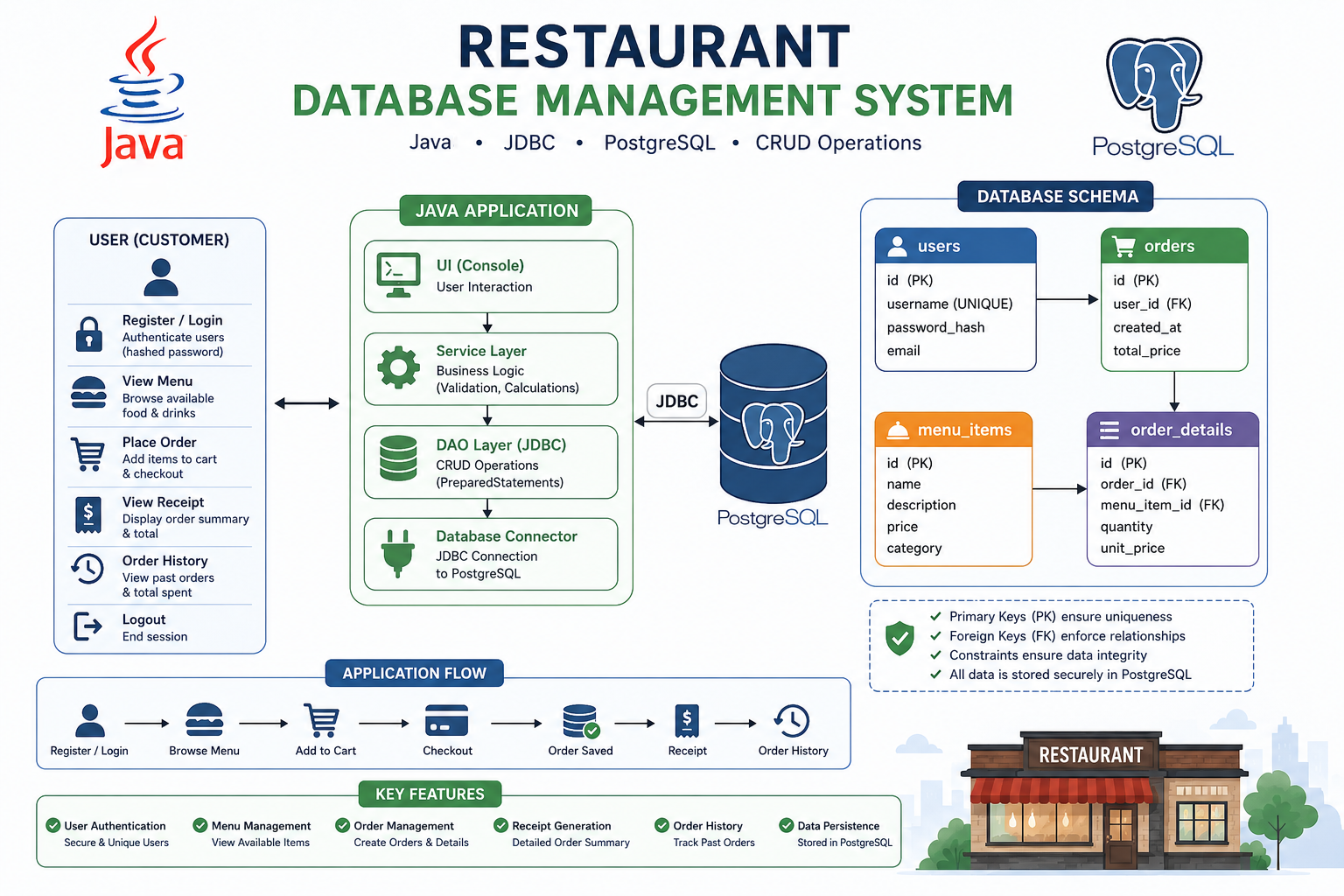
## 📖 Overview
In this workshop, you will build a **Restaurant Management System** focused on database design, PostgreSQL, and JDBC integration.
The primary goal of this project is to practice working with relational databases. You will design a well-structured database schema, manage relationships between tables (Primary and Foreign Keys), and connect a Java application to a PostgreSQL database to perform CRUD operations.
You will implement a backend system where users can create accounts, view the restaurant's menu, place orders, and store all transaction data permanently in a database.
**Tech Stack:**
- **Language:** Java 23
- **Build Tool:** Maven
- **Database:** PostgreSQL
- **API:** JDBC
## ✅ Prerequisites
Before starting, ensure you have the following installed on your machine:
- Git
- Java 23 (JDK)
- Maven
- PostgreSQL
- A PostgreSQL Database GUI (e.g., pgAdmin, DBeaver, or DataGrip)
## ⚙️ Maven Configuration
This project relies on **Maven** to manage dependencies. Your project must contain a `pom.xml` file configured for Java 23 and the PostgreSQL JDBC driver.
**Example `pom.xml` snippet:**
```XML
23
23
UTF-8
42.7.8
org.postgresql
postgresql
${postgresql.version}
```
## 🎯 Objectives
By completing this assignment, you will be able to:
- Design a structured relational database schema.
- Understand and implement database relationships (One-to-Many).
- Work effectively with **Primary Keys (PK)** and **Foreign Keys (FK)**.
- Write SQL scripts to create tables and insert initial data.
- Connect a Java application to PostgreSQL using JDBC.
- Implement **CRUD** (Create, Read, Update, Delete) operations via Java.
- Build a modular and object-oriented backend application.
## 🏗️ Database Entities & Schema
Your database must be created using a `database.sql` script.
The script must include:
* Table creation statements
* Keys and relationships
* Appropriate constraints
* Initial mock data
You are responsible for selecting appropriate:
* Data types
* Primary Keys
* Foreign Keys
* Constraints (e.g., `NOT NULL`, `UNIQUE`, `CHECK`, `DEFAULT`)
Your design decisions will be evaluated as part of the assignment.
---
### 1. User (Customer)
Represents a customer using the system.
Required Information:
* Unique identifier
* Username
* Password
* Email (optional)
Requirements:
* Usernames must be unique.
* Passwords must not be stored in plain text.
* A user can place multiple orders.
---
### 2. MenuItem
Represents a food or drink available in the restaurant.
Required Information:
* Unique identifier
* Name
* Description (optional)
* Price
* Category (optional)
Requirements:
* Every item must have a positive price.
* The database must contain at least 3 menu items inserted through the SQL script.
---
### 3. Order
Represents a specific order placed by a customer.
Required Information:
* Unique identifier
* Reference to the customer who placed the order
* Creation date and time
* Total price
Requirements:
* An order belongs to exactly one user.
* A user can have multiple orders.
* An order can contain multiple items.
Note:
Order is a reserved SQL keyword in many database systems.
Choose an appropriate table name such as `orders` if needed.
---
---
### 4. OrderDetail
Represents an item inside an order.
Required Information:
* Unique identifier
* Reference to an order
* Reference to a menu item
* Quantity
* Item price at the time of purchase
Requirements:
* Quantity must always be greater than zero.
* The stored price should represent the item's price when the order was placed.
* An order can contain multiple order details.
---
### Design Notes
Before implementing the schema, carefully design:
* The primary key of each entity.
* The foreign key relationships.
* Any uniqueness constraints.
* Any required fields.
* Any validation rules that should be enforced by the database.
Your schema should be normalized and designed to avoid unnecessary data duplication.
### Recommendation
Before writing any SQL, create a simple Entity Relationship Diagram (ERD) to visualize:
* Entities
* Primary Keys
* Foreign Keys
* Relationships between tables
This diagram does not need to be submitted, but it is strongly recommended as part of the database design process.
## 📁 Project Structure
A suggested structure for the project:
- model
- Database entity classes
- database
- PostgreSQL connection management classes
- dao
- JDBC database access classes
- service
- Application business logic
- ui
- Console user interface
## 💻 Required Features & App Flow
You must create a Java application that communicates solely with PostgreSQL using JDBC. **Do not store any application data in local text files.**
### Feature 1: User Management (Auth)
- **Register:** Insert a new user. Verify the username is unique and hash the password before saving.
- **Login:** Validate credentials against the database. Handle incorrect username or password scenarios gracefully.
### Feature 2: Menu Browsing
- Fetch and display all available `MenuItem` records from the database.
### Feature 3: Order Creation
- Allow the logged-in user to select items from the menu and specify a quantity.
- Calculate the total price.
- Save the `Order` record, and subsequently save the corresponding `OrderDetail` records.
### Feature 4: Receipt Generation
- After an order is placed, query the database to print a detailed receipt.
- **Must include:** Item names, quantities, unit prices, subtotal per item, and the final grand total.
### Feature 5: Order History
- Allow a user to view all their past orders and the total amount spent on each.
## 📱 Sample Console Menu Template
To give you an idea of how your application should flow, here is a recommended structure for your Command Line Interface :
Plaintext
```
=======================================
🍕 WELCOME TO JAVA PIZZERIA 🍕
=======================================
1. Login
2. Register New Account
3. Exit
=======================================
Choose an option: 1
[Login]
Enter username: ***
Enter password: ***
=======================================
🍽️ MAIN MENU 🍽️
=======================================
1. View Menu
2. Place a New Order
3. View Order History
4. Logout
=======================================
Choose an option: 2
[Placing Order]
Available Items:
1. Pizza - $10.00
2. Burger - $8.00
3. Pasta - $12.00
Enter the ID of the item to add (or 0 to finish): 1
Enter quantity: 2
Added 2x Pizza to your cart.
Enter the ID of the item to add (or 0 to finish): 0
[Order Summary / Receipt]
---------------------------------------
Item Qty Unit Total
---------------------------------------
Pizza 2 $10.00 $20.00
---------------------------------------
Final Total: $20.00
Order saved successfully!
```
## 📃 Evaluation Criteria
Your project will be graded based on the following:
**1. Database Design:**
- Correct schema design with appropriately chosen data types, keys, constraints, and relationships.
- Proper use of Primary Keys, Foreign Keys, and Constraints (e.g., `NOT NULL`, `UNIQUE`).
- A working `database.sql` initialization script.
**2. JDBC Integration:**
- Successful connection to PostgreSQL.
- Use of `PreparedStatement` to prevent SQL injection.
- Proper exception handling (`SQLException`).
**3. Code Quality & OOP:**
- Clean structure (e.g., separating database logic into DAO classes).
- Avoidance of code duplication.
- Application successfully covers all required functionalities (Auth, Menu, Ordering, Receipts, Order History).